
Stock and orders
Selling the same product in two places should not mean tracking stock in three. Products, stock, prices and orders live in one place, and Trendyol and Hepsiburada are fed from there.
Stock, profit and ads that know about each other
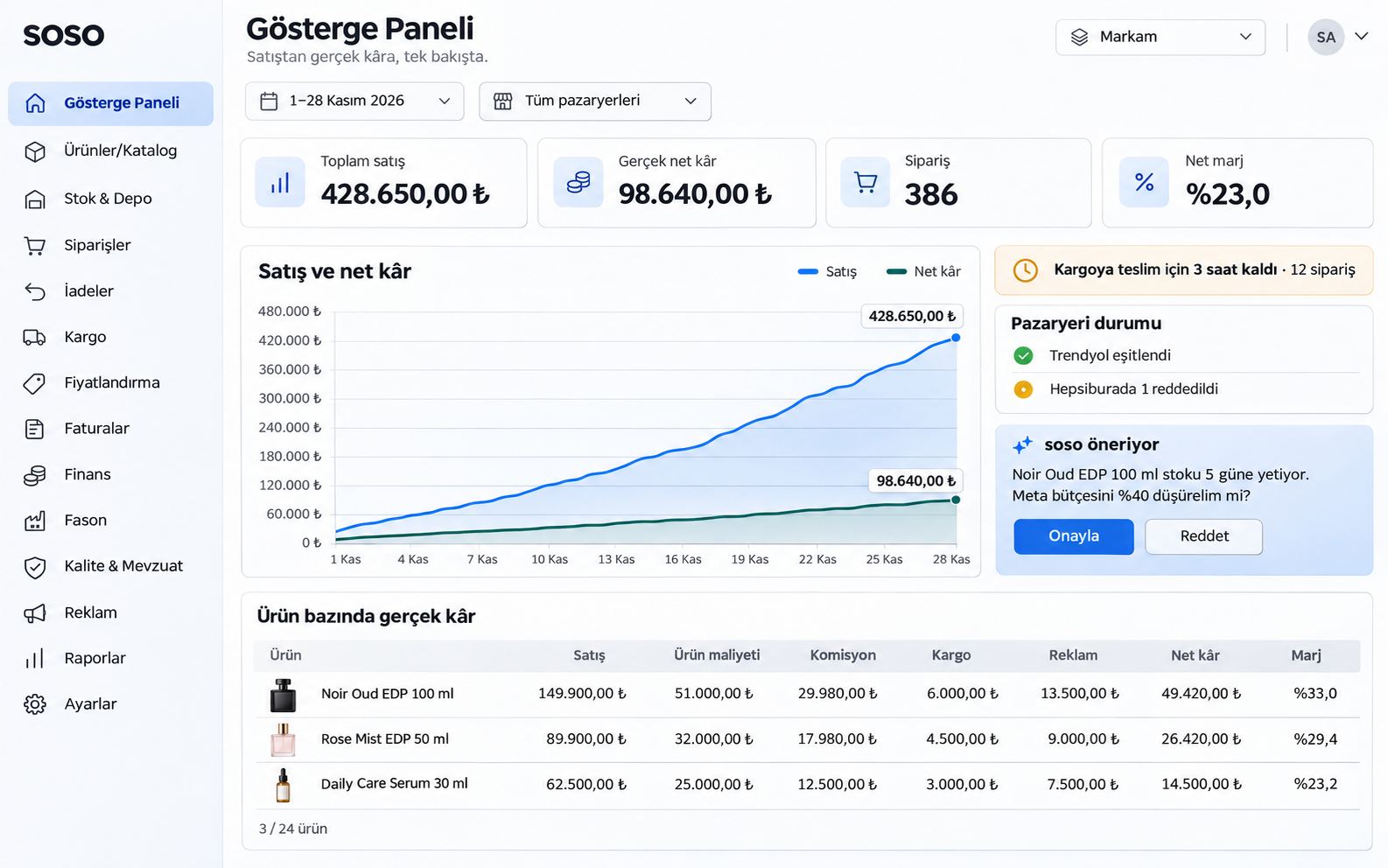
Seeing stock and ad budget together helps you decide. SoSoAds puts them side by side and suggests budget cuts with a reason.
Which plans: Suggestions are included in every plan. Sending an approved change to Meta will open once Meta’s approvals are complete. Coming soon on Professional and Enterprise.
The panel looks at your daily sales pace and your supply lead time. With 40 towel sets left, 8 selling a day and the next batch 12 days out, a suggestion to cut the budget lands in front of you.
The card shows what is suggested, why, and how much the budget would change. You approve or reject it. Who approved what, and when, stays on record. Suggestions to raise a budget stay off until you switch them on.
You set daily and monthly spend caps for actions to be applied through SoSoAds. This setting does not automatically stop spending by campaigns already running on Meta. You also set the suggested reduction and stock threshold in the panel.
It will send your product details, prices and stock status to the Meta catalogue, opening once Meta’s approvals are complete. A stock update alone does not stop your ads.
Budget changes you approve will go straight from the panel to your Meta account. Coming soon on Professional and Enterprise.
One example. You have 40 bamboo towel sets left and sell 8 a day. The next batch arrives in 12 days. Keep the ads running at this pace and you could keep paying to promote a product that is out of stock.
SoSoAI suggests
Bamboo Towel Set has 5 days of stock left. Cut the Meta daily budget by 40%?
Why · 40 units in stock · 8 sales a day · next batch in 12 days
 After you approve
Coming soon Sending an approved change straight to your Meta account will open once Meta’s approvals are complete. Coming soon on Professional and Enterprise; suggestions and their reasoning are included in every plan.
How many days of stock should trigger a suggestion, and how large the suggested budget cut should be. Both are settings in the panel. Suggestions to raise a budget stay off until you switch them on.
Selling the same product in two places should not mean tracking stock in three. Products, stock, prices and orders live in one place, and Trendyol and Hepsiburada are fed from there.
If revenue looks good but cash is short, look at commission, shipping, returns and ads. SoSoAds deducts these along with product cost from each sale and shows what is left, product by product. Tax and fixed costs are excluded; the result depends on source data and the costs you enter.
A printed catalogue is out of date the day a price changes. Build a collection in the panel and the tablet or kiosk in your shop shows it with your own logo and colours. The screen adapts to the sector you sell in. Perfume and cosmetics screens are ready, and the clothing screen is coming soon.
SoSoAI is the assistant inside the panel, designed to answer stock, profit and order questions from your own data and link to the relevant screen. Personal data is automatically removed on our servers before content is sent to AI providers.
The demo takes about half an hour. We walk through the stock, profit and ad screens using your products. We reply to every request within two business days.